Flexy.GameFlow
Hierarchical Game State Architecture for Unity
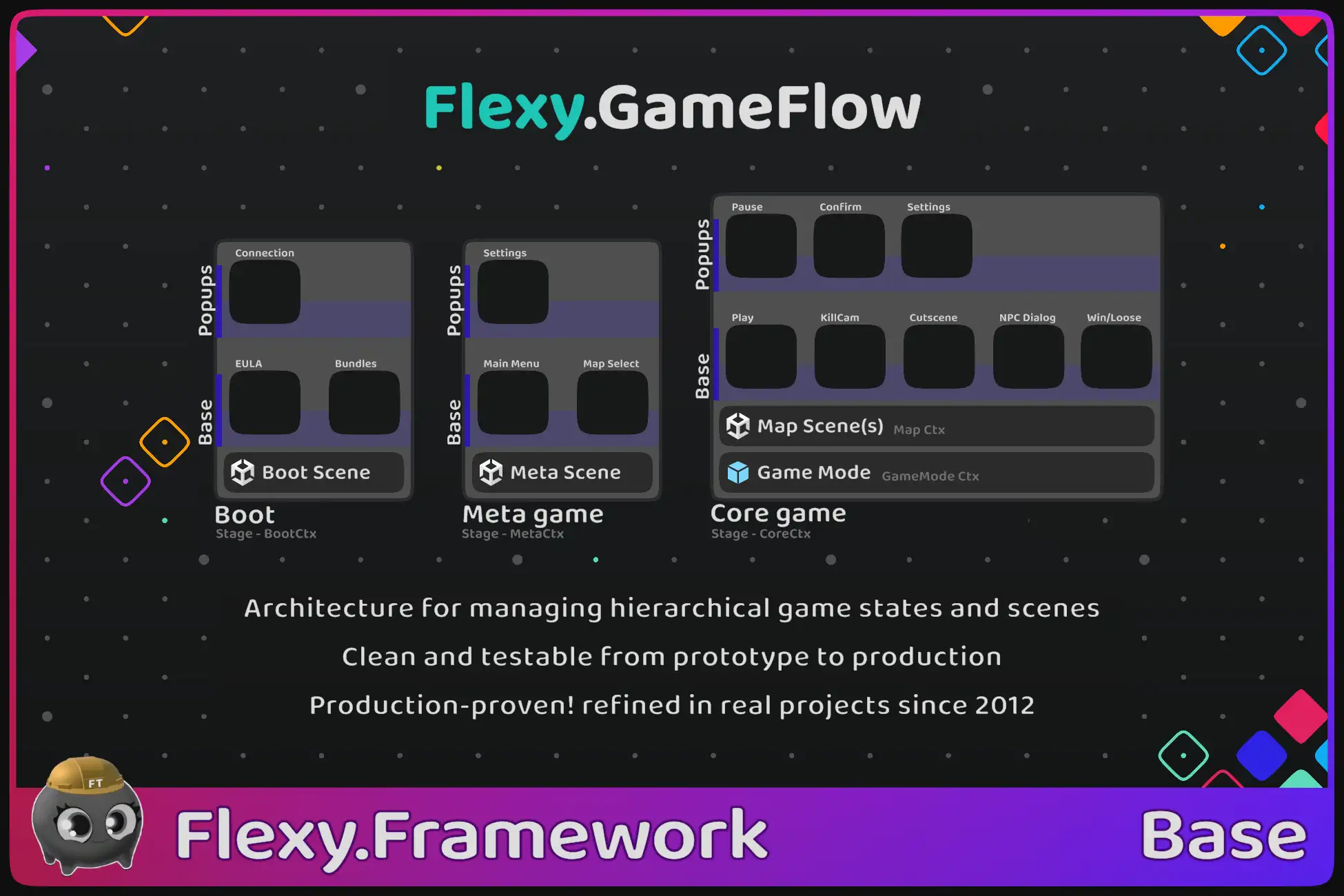
Flexy.GameFlow is a production-grade runtime framework that structures the entire game as explicit hierarchical states instead of scene-driven flow
It orchestrates global game stages (Boot → Menu/Meta → Core/Gameplay)
Drives UI navigation as states (Main Menu, Settings, Shop, Rewards, Arsenal)
Manages gameplay states (Play, Pause, Win, Lose, Results, Cutscenes) and nested substates (Boss Fights, Result Tabs, Phase Controllers)
Scenes, transitions, data flow, and runtime context are all controlled through the state hierarchy, allowing every part of the game to remain isolated, testable, and deterministic
---
What Flexy.GameFlow Is
Core Responsibilities
- Treat the entire game as a hierarchical graph of explicit states rather than a collection of loosely connected scenes
- Define and control global game stages (Boot → Menu/Meta → Gameplay/Core) as first-class runtime states
- Manage navigation between states with deterministic forward and backward transitions
- Control scene lifecycle directly from states (load, unload, reuse, replace)
- Use states as the universal abstraction for UI screens, overlays, play states and substates
- Guarantee safe asynchronous transitions with strict execution order and no race conditions
- Provide explicit data flow between states via strongly defined input parameters and results
- Allow any state or stage to be launched independently for development and testing
- Encapsulate services and runtime scope inside GameStages through GameContext lifecycle management
- Provide a unified control layer for flow, scenes, and UI instead of separate managers
Included Features
- Full hierarchical Game State runtime used to control the entire game lifecycle
- FlowGraph and FlowNodes as a logical navigation layer separated from visual State prefabs
- Scene management driven by states with support for Single and Additive loading
- Automatic Back/Forward navigation through the FlowGraph history
- Awaitable states returning explicit results for gameplay, UI decisions, and flow sequencing
- Bootstrap system allowing Play Mode entry from any scene while restoring correct state hierarchy
- GameStage-scoped GameContext lifecycle ensuring clean creation and destruction of services
- CrossSceneRef system for accessing objects across scenes without hard dependencies
- ServiceGameFlow as the root runtime state and central entry point for controlling GameFlow
- TransitionHost system responsible for deterministic state transitions, customizable per state
- Dedicated TestScenes enabling isolated development and fast iteration per state
Pro Capabilities
- Custom StateTransitions for full control over visual transitions between states
- State Layers allowing one active state per layer (e.g. Base layer + Popup layer)
- Popup Layer included by default inside GameStages
- SubScenes for modular scene composition managed automatically by parent scenes
- SceneSets as a helper to load multiple predefined scenes in a single call
- Asynchronous State preloading to prepare states before they are shown
- Logical lifecycle callbacks (Open, Close, Forward, Back) in addition to Show/Hide
- Opening states at exact positions inside FlowGraph history
- State Locking — new states are opened before the locked state in history so it is not interrupted
- HardRestart functionality to reset the game flow back to the first stage
- Attributes allowing states to be auto-opened as substates of other states
- Advanced orchestration utilities required for complex production game flows
Architecture Model
- FlowGraph → defines the full logical structure of the game, including hierarchy, navigation paths, and state relationships
- FlowNode → runtime logical unit representing a position in the graph, storing forward/back links, parent/child connections, open parameters, and additional user data
- State → visual and behavioral representation of a FlowNode implemented as a MonoBehaviour on a prefab
- GameStage → specialized State that owns its own GameContext, creating a scoped service lifetime tied to that stage
- Service_GameFlow → root State of the entire system and parent container for all GameStages
- TransitionHost → runtime executor responsible for queued, deterministic, asynchronous transitions between visual states
Integration with Flexy Framework
- Deeply integrated with Flexy.Core through GameContext, which provides scoped service lifetime bound to GameStages
- Each GameStage automatically creates its own GameContext that inherits from the previous stage’s context
- Destroying a GameStage destroys its entire GameContext and all registered services
- Uses Flexy.AssetRefs for StateRef and SceneRef to eliminate hard references and BuildSettings dependency
- Loaded scenes are registered in GameContext before scene loading finishes, allowing scene objects to access services from Awake
- Fully aligned with Flexy.Bricks architecture where each State acts as an independent Brick
What Flexy.GameFlow Is Not
Explicit Non-Goals
- Not a gameplay FSM for characters, enemies, or mechanics
- Not a UI rendering framework or visual builder
- Not a visual scripting or node editor tool
- Not a replacement for Unity SceneManager (it orchestrates scenes, does not replace the API)
- Not a dependency injection container (it uses GameContext for scoped services)
- Not a no-code solution — states must be implemented in C#
Who Flexy.GameFlow Is For
UI-Heavy Games
- Projects with many menus, windows, popups, overlays, reward screens, nested UI flows
- Games where UI navigation becomes complex and hard to manage with scenes alone
Gameplay-Centric Games
- Games requiring structured gameplay phases such as Play, Pause, Win/Lose, Results, Cutscenes, Boss encounters
- Projects where gameplay flow must be explicit and controlled
Growing Productions
- When prototypes expand and scene-driven flow becomes fragile
- Projects starting to accumulate multiple managers for menus and transitions
Prototyping to Production
- Safe to adopt from the very beginning of development
- Does not slow down early prototyping
- Provides structure that remains valid as the project grows
- Eliminates the need to rewrite flow architecture later
Solo Developers
- Developers who want production-grade architecture without writing their own flow system
- Projects that must remain manageable long-term
Teams with Designers & UI Artists
- UI states can be tested independently without running full game
- Designers can iterate on flows safely using TestScenes
Fast Iteration Workflows
- Direct launch of any state dramatically reduces testing time
- Enables gameplay sandbox and screen-level testing
Networked Games
- Games where deterministic state control is critical
- Multiplayer projects needing structured scene and flow orchestration
Who It Is Not For
- Projects that consist of only one gameplay scene with no menus or transitions
- Developers who prefer fully hardcoded scene-driven flow without abstraction
- Teams expecting a visual drag-and-drop flow editor with no coding
Core Design Philosophy
Speed over Purity
- Designed for real production needs rather than academic architecture
- Optimized for iteration speed across the entire project lifecycle
- Reduces friction when adding or changing game states
Visual over Hardcoded
- Game structure is represented by state prefabs instead of enums or IDs
- Eliminates manual wiring typically required in scene-based managers
- Keeps project organization clear and inspectable in Unity
Explicit over Magic
- State lifecycle is fully controlled and predictable
- Data flow between states is defined explicitly via parameters and results
- Transitions happen deterministically without hidden side effects
Speed and Iteration Workflow
Typical State Creation Flow
- Create a new State MonoBehaviour describing behavior
- Create or duplicate a prefab that represents the state visually
- The state is automatically added to FlowLibrary by default (can be disabled for manual control)
- Optionally create a dedicated TestScene for isolated launch
- Press Play and start directly in that state
No Registration System
- No enums to update when adding new states
- No manager lists or static registries
- States are discovered and referenced via AssetRefs
No Identifiers or Paths
- No string-based scene names
- No Resources folder dependency
- SceneRefs and StateRefs allow refactor-safe linking
Logic and Code
Role of Code
- Code defines the behavior, rules, and lifecycle of each State
- States explicitly control what should happen on show, hide, open, and close
- Data required for a state is passed via OpenParams
- Results produced by a state are returned explicitly when it finishes
Ready-to-Use Helpers
- Template projects demonstrate common flow patterns
- Bootstrap prefabs simplify runtime setup
- Example states help developers understand best usage quickly
Recommended Best Practice
- Treat every state as an isolated gameplay or UI brick
- Avoid cross-state dependencies
- Keep state responsibility focused and self-contained
Runtime Safety and Execution Order
Guaranteed Runtime Context
- GameFlowBootstrap prefab initializes Service_GameFlow before scene logic
- GameStages and their GameContexts are created on frame 0
- Scene is registered inside GameContext before any Awake in that scene runs
- Ensures every object can safely access the correct runtime scope immediately
Stability in Complex Scenarios
- State transitions are queued and cannot overlap
- A transition must fully finish before the next begins
- Prevents double-open, race conditions, and invalid visual states
- Lifecycle ownership ensures states clean up deterministically
State Testing and TestCases
Isolated State Testing
- Any State can be launched directly from a TestScene
- No need to run Boot or navigate through the game flow
- GameFlow automatically reconstructs the correct GameStage and hierarchy
- Works for UI states and gameplay states equally
Scenario-Based TestCases
- States can define lightweight TestCases for exact runtime situations
- Example: Start directly in the middle of a BossFight phase
- Example: Launch a Cutscene state right before it begins
- Example: Enter gameplay map with predefined player condition (low HP, specific equipment)
- Example: Launch Reward or Results states with exact data
- Allows precise testing without gameplay preparation or cheats
Debugging Benefits
- Eliminates the need for temporary hacks and manual setup
- Makes any game situation reproducible and deterministic
- Dramatically speeds up development and testing iterations
Advanced Transitions
Animated State Flow
- TransitionHost controls visual appearance and disappearance of states asynchronously
- Show and Hide are executed inside the transition pipeline rather than immediately
- Default transition is simple, Pro allows full customization of transition logic and animation order
Loader Screens
- Recommended implementation is an umbrella visual GameObject on each GameStage
- Stage loader is activated at the beginning of OnShow and deactivated at the end of OnShow
- In Pro version an umbrella can also be placed on the Root State
- Root loader is activated on custom transition begin and deactivated on custom transition end
- Used to visually cover scene loading or heavy state initialization
Scalability Across Team Sizes
Solo Developers
- Provides production-level flow architecture from day one
- No need to design or maintain custom game state systems
- Allows rapid prototyping without sacrificing future scalability
Small Teams
- Designers, UI artists, and programmers can work on states independently
- Clear boundaries reduce merge conflicts and accidental coupling
- TestScenes allow each team member to iterate on their part in isolation
Large Studios
- State hierarchy naturally decomposes the game into manageable modules
- Multiple UI systems and gameplay systems can coexist under GameFlow
- Layered states (Pro) enable complex overlays and production flows
- GameStages isolate service scopes for different parts of the game
Instance-Based Architecture
- GameFlow is runtime-instance driven rather than static singletons
- Allows multiple independent flows if needed (split screen, multi-context testing)
Comparison With Common Approaches
Ad-hoc Scene & UI Managers
- Logic tied directly to scenes and GameObjects
- Hidden dependencies between menus and gameplay
- Hard to reuse flows or change navigation
- Async transitions become fragile coroutine chains
Home-Grown Game State Systems
- Require months or years to reach production stability
- Often incomplete (no hierarchy, no history, no isolation)
- Difficult to maintain as the team grows
- High risk of architectural rewrites mid-production
Heavy Architectural Frameworks
- High learning curve and onboarding time
- Introduce many concepts unrelated to immediate gameplay needs
- Slow iteration during early development
- Difficult to adapt to Unity scene workflows
Flexy.GameFlow Advantages
- Treats entire game as explicit state hierarchy
- Scenes become resources instead of flow controllers
- Deterministic queued transitions prevent race conditions
- State-level isolation for gameplay and UI testing
- Uses Unity concepts with minimal additional abstractions so it feels like vanilla Unity while providing much richer control
- Built from real production experience rather than theory
Trust and Maturity
Production Usage
- GameFlow is used as a foundation in multiple shipped games
- Proven in real production environments including multiplayer titles
- Architecture refined through long-term projects rather than demos
Longevity
- First versions date back to 2012
- Evolved continuously across Unity versions and platforms
- Matured through solving real-world production problems
Showcase Role
- Template projects are real working examples, not artificial demos
- Demonstrate full game flow, scene control, UI states, and testing workflows
- Serve as reference implementations and learning material
Responsibility Boundaries
What Flexy.GameFlow Does Not Cover
- Does not design game architecture automatically
- Does not replace gameplay systems or mechanics
- Does not remove the need for proper state decomposition decisions
- Does not provide built-in visual transition effects (only structure and hooks)
- Does not manage assets unrelated to state or scene flow
Summary
Key Benefits
- Structures the entire game as an explicit hierarchical State graph
- Decouples game flow from Unity scenes and replaces fragmented managers with one unified system
- Provides deterministic asynchronous transitions with guaranteed execution order
- Enables launching and testing any State or GameStage in full isolation
- Automatically scopes and cleans runtime services through GameStage GameContexts
- Keeps projects scalable and maintainable from prototype to production
Design Intent
- Serve as the architectural backbone that defines how the game starts, navigates, loads scenes, runs gameplay phases, and exits safely
Ideal Project Fit
- Projects that value long-term stability, fast iteration, modular structure, and production-safe game flow