Flexy.Tools / Base
Flexy.GameFlow
Hierarchical game state architecture for Unity
GameFlow Pro
 1 / 26
Overview
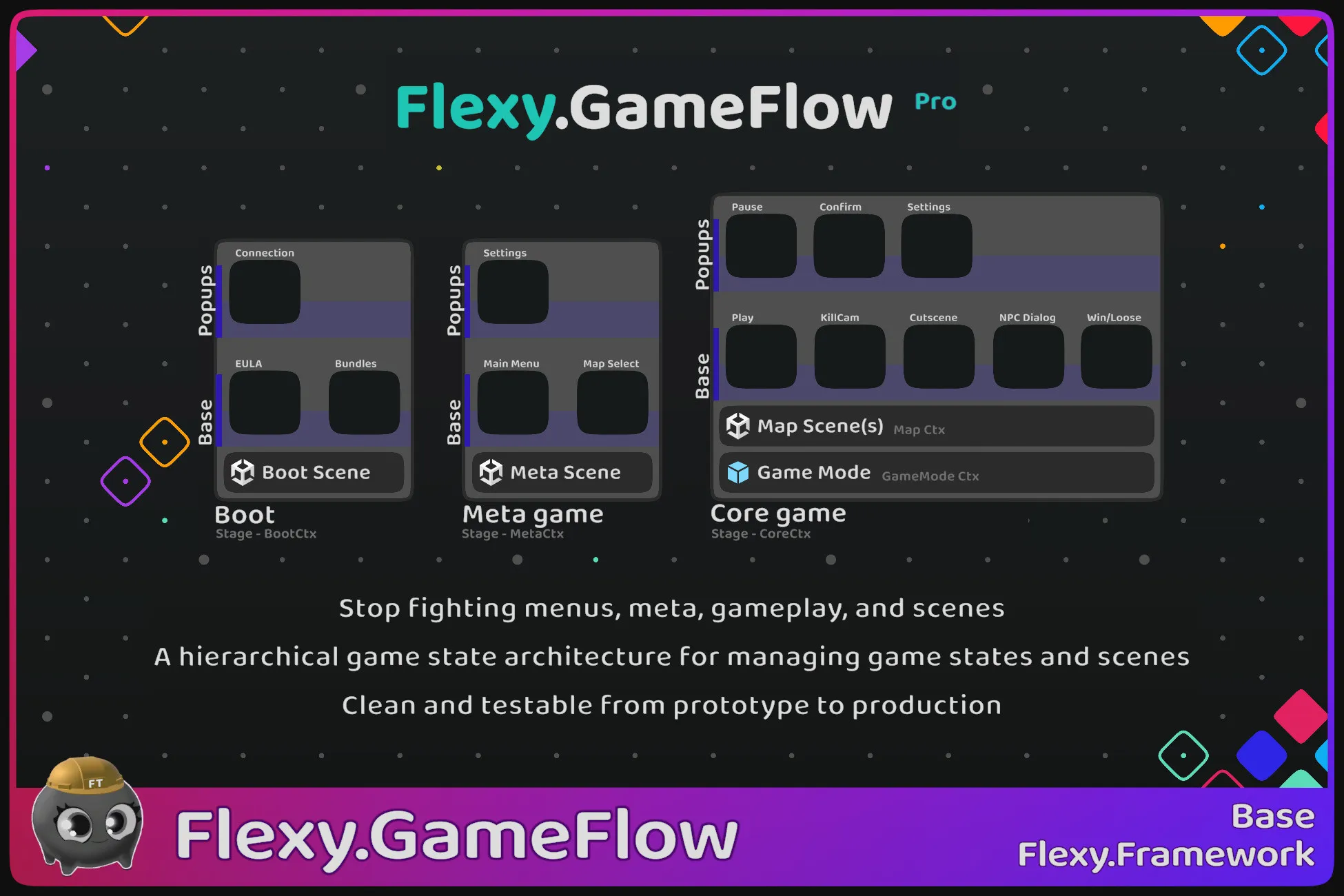
Hierarchical game state architecture for managing game states and scenes
Clean and testable from prototype to production
Description
GameFlow Pro
Docs | Discussions | Try Lite version for Free
Overview
Flexy.GameFlow is a runtime architecture framework for Unity that replaces fragmented, ad-hoc game flow logic with explicit hierarchical states
Instead of spreading flow logic across scenes, managers, FSMs, coroutines, and callbacks, your game becomes a structured State graph with clear ownership and lifecycle
- Build and test game features and UI in isolation - no extra steps, setup, or side effects
- 2–3× faster iteration on features and UI
- Double team efficiency — half the cost
- Production-proven architecture that scales without breaking
- Big game stages (Boot → Menu/Meta → Play/Core
- UI navigation as states (Main Menu, Settings, Shop, Rewards, Arsenal)
- Gameplay states (Play, Pause, Win, Lose, Results, Cutscenes, Dialogs)
- Nested substates (Boss fights, result tabs, phase controllers)
- Any game state can be launched and tested in isolation
- Transitions are deterministic and awaitable
- Scenes, transitions, data flow, and runtime context are controlled through the state hierarchy
- Keep every part of the game isolated, testable, and deterministic
- Feels like vanilla Unity — just much more powerful
Flexy.GameFlow has been used and refined in real production projects since 2014
When Game Starts Working Against You
As projects grow, game flow logic becomes fragile and hard to reason about
- Adding a new menu or gameplay step introduces hidden coupling
- Flow logic becomes scattered across scenes, managers, and MonoBehaviours
- Async transitions turn into complex coroutine or callback chains
- Dependencies spread across unrelated systems, even when using DI
- Testing a single screen or gameplay phase requires running the entire game
Flexy.GameFlow addresses these problems by design
- One hierarchical state model for boot, menus, and gameplay
- Any state can be launched and tested directly
- Enter Play Mode from any scene with the correct state hierarchy on frame 0
- Scene loading and unloading driven by states
- Awaitable states with explicit input and output
- Deterministic transitions with guaranteed execution order
- Clean lifecycle ownership and automatic cleanup
- Scales naturally from prototype to production
Key Benefits
- One unified system for game flow, scenes, and UI
- Explicit hierarchical state architecture
- Scene-independent navigation
- Deterministic async transitions
- Launch any state directly for testing
- Scoped service lifecycle per GameStage
- Safe from prototype to long-term production
- Removes the need for custom flow managers
Key Features
- Hierarchical GameStages (Boot, Menu, Gameplay)
- FlowGraph & FlowNodes for logical navigation
- State-driven scene loading (Single & Additive)
- Back/Forward navigation with history
- Awaitable states with explicit results
- GameContext scoped per GameStage
- Play Mode entry from any scene
- TestScenes and TestCases for isolation
- CrossSceneRef system
- TransitionHost for safe visual transitions
Pro Features
- Support for custom state layers (e.g. popup layer)
- Substates
- State locking (for networked games)
- Customizable transition logic for unique and rich state transitions
- SpawnTarget for injectiong state into any point
- Logical Open/Close and Forward/Back lifecycle hooks
- Precise await points for logical and visual state changes
- Asynchronous preload of state views
- Reboot game in full or from first stage
- More to come...
Is This for You?
Flexy.GameFlow is a good fit if you:
- Build games with multiple menus and gameplay phases
- Struggle with fragmented or ad-hoc game flow logic
- Want deterministic async transitions
- Need fast iteration and isolated testing
- Work solo or in a team
- Plan long-term production
Flexy.GameFlow is not a good fit if you:
- Build very small single-scene games
- Prefer fully hardcoded scene logic
- Expect a visual no-code flow editor
Flexy.GameFlow is an architectural foundation and is intended to be adopted early
Why Not FSMs or Scene Managers?
- Classic FSMs do not scale to full game hierarchies with async transitions
- Scene managers couple logic to scenes and make testing difficult
Flexy.GameFlow treats game states as first-class, with hierarchy, isolation, and deterministic transitions
It uses standard Unity concepts with minimal additional abstractions,
It provides a higher-level orchestration layer that defines how game states relate, transition, and execute safely
How to create new state
- Create State MonoBehaviour describing behavior
- Create prefab representing that state
- State is automatically added to the FlowGraph
- Open states through ServiceGameFlow
- States load scenes, manage transitions, and return results
Game flow becomes navigation between states rather than hardwired scene switching
Showcase Projects
Learn through real, buildable template projects
- FlexyTT.Barley-Break - pro version of barley break
- Flexy.TTMinimal GameFlow Showcase
These demonstrate full game flow, scene control, UI states, and testing workflows
Technical details
Compatibility
- Unity 2022.3 → Unity 6.3
- Modern C# (C# 10)
- Domain Reload safe
- Depends on Flexy.Core & Flexy.AssetRefs
- SceneManager used under the hood via SceneRefs
- Render pipeline agnostic
- Platform agnostic
- Networking friendly
Code Basics
- Single State base class for all state types (gameplay, UI, substates)
- Virtual Show/Hide and BackShow/ForwardHide methods
- Deterministic bootstrap initializes the correct state hierarchy from any scene
- Explicit state cleanup via Stage.CloseAndDestroy
- Explicit input and output data passed between states
- Awaitable states and transitions with strongly defined results
- Cross-scene references without hard scene dependencies
- Bootstrap prefab initializes the Service_GameFlow runtime
- Explicit GameStage abstraction for major phases (Boot, Menu, Play)
- FlowLibrary is centralized registry of states
- Graph-based state model using FlowGraph and FlowNode
- Runtime tracking of active and current state nodes
Compatibility
Flexy.Core and Flexy.AssetRefs dependencies included for ease of use